
English
中文
Français
Español
العربية
Pусский
Deutsch
日本語
Português
हिन्दी
Getting Started
How to use IpStar proxy
FAQ
SCRAPER
Integrate IpStar on Windows
Step 1: Download the proxy software Proxifier
Search for "Proxifier" on Google to download. Official website download address (paid): . We provide a free Chinese cracked version, .
STEP 2: OPEN THE PROXiIMITOR
Click "Profile" ->"Proxy Server"
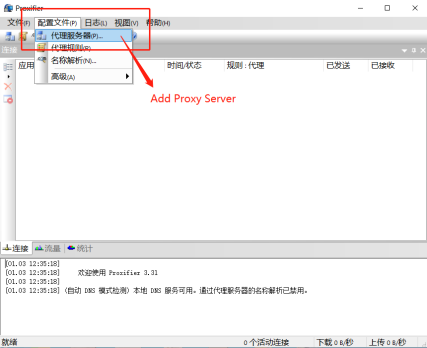
STEP 3: ADD A PROXY SERVER
Click "Add"
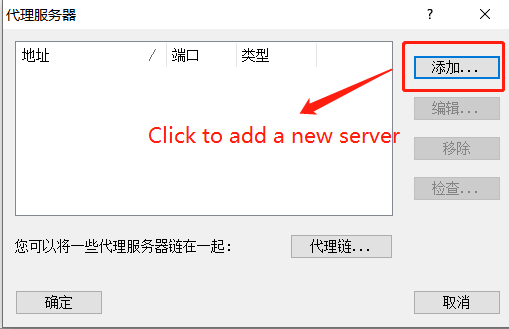
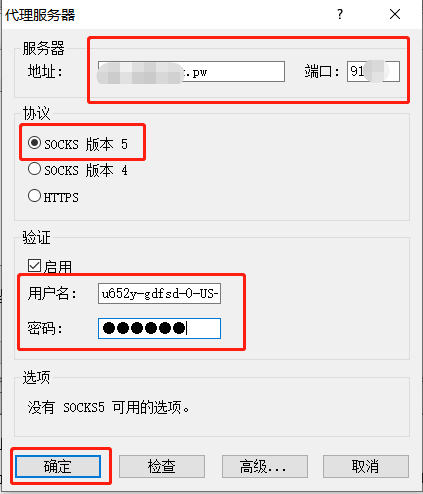
STEP 4: FILL IN THE PROXY INFORMATION
Set up the setttings of the proxy server, you can get those info through "Obtain proxy " menu on your management console of the website.
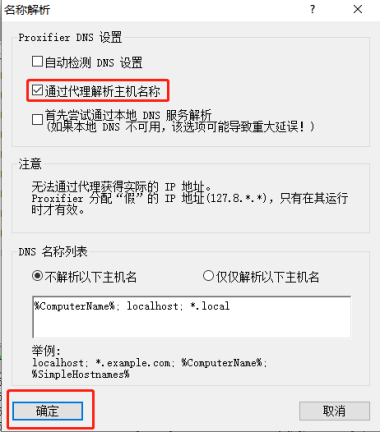
STEP 5: CONFIGURE NAME RESOLUTION (OPTIONAL)
Configure "name resolution" and click "OK" after modification
Use a browser to visit "http://ipinfo" to test if the proxy is working. Check if the public IP address has changed to confirm successful proxying.