
English
中文
Français
Español
العربية
Pусский
Deutsch
日本語
Português
हिन्दी
Getting Started
How to use IpStar proxy
FAQ
SCRAPER
Integrate IpStar on iOS
Step 1: Download the proxy software Shadowrocket
Log in to the App Store with a US Apple ID, search for "Shadowrocket" (commonly known as the Little Rocket) to download and install, or click here to download. (Mainland Chinese users need to log in with an overseas ID, such as a US ID. US Apple IDs can be purchased on Taobao/Xianyu).
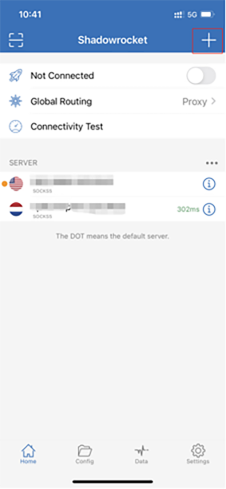
STEP 2: OPEN THE SMALL ROCKET
After opening the shadowlock, click the "+".
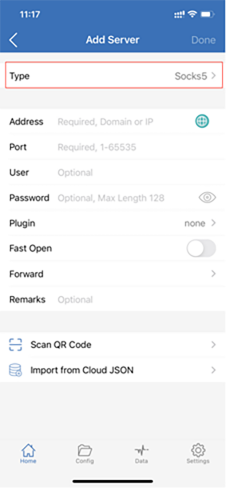
STEP 3: SELECT THE TYPE
Select Socks5 or HTTP as the type.
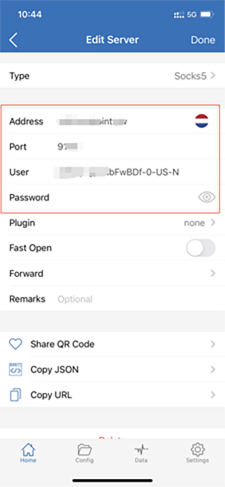
STEP 4: FILL IN THE PROXY INFORMATION
Fill in the server and user password. You can see these parameters in the list obtained through the Obtain proxy function on the console:
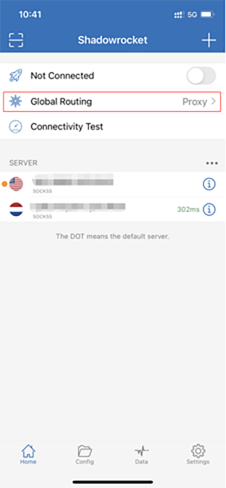
STEP 5: SELECT THE GLOBAL PATH FROM
You will receive an iOS prompt, add Shadowrocket to the VPN configuration, and click Add.
STEP 6: OPEN THE PROXY AND TEST
Turn on the proxy switch button, and the configuration is complete.
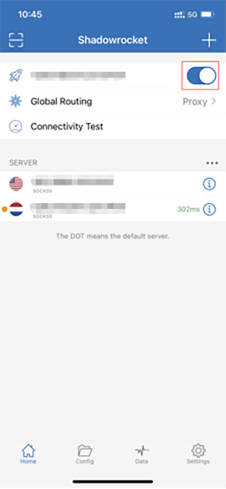
Use a browser to visit "http://ipinfo" to test if the proxy is working. Check if the public IP address has changed to confirm successful proxying.