
English
中文
Français
Español
العربية
Pусский
Deutsch
日本語
Português
हिन्दी
Getting Started
How to use IpStar proxy
FAQ
SCRAPER
Integrate IpStar on Android
Install and open IpStar on your Android device.
Step 1: Download the proxy app
Search and download the "v2rayNG" APP in a search engine or app store, or click here to download. For more versions, please see: https://github.com/2dust/v2rayNG/releases
STEP 2: OPEN V2RAYNG
Click the "+menu" in the upper left corner.
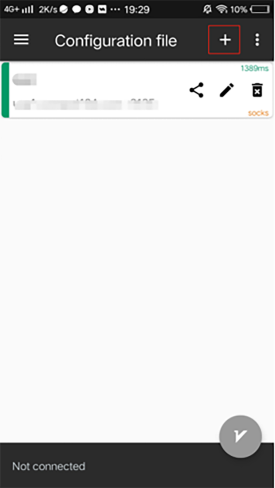
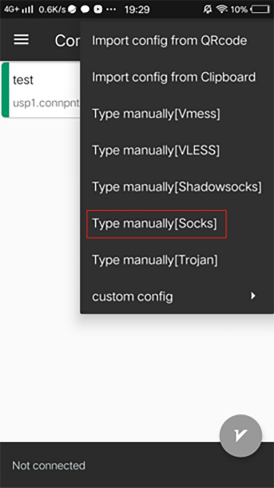
STEP 3: ADD A PROXY SERVER
Click "Add proxy server".
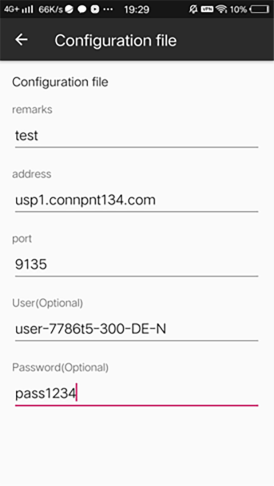
STEP 4: FILL IN THE PROXY INFORMATION
Set up the settings of the proxy server, you can get those info through "Obtain proxy" menu on your management console of the website.
STEP 5: OPEN THE PROXY AND TEST
Open the proxy, click the V icon in the lower right corner to open the proxy. When the "vpn icon" appears in the phone's notification bar, the proxy IP is successful.
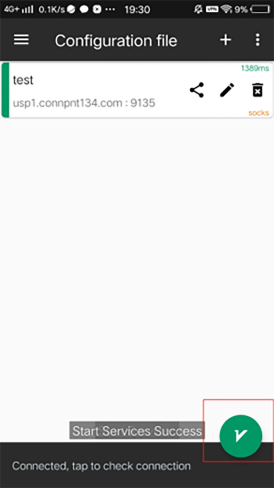
Configuration complete. Visit \"http://ipinfo\" to test the proxy and check your external IP address.